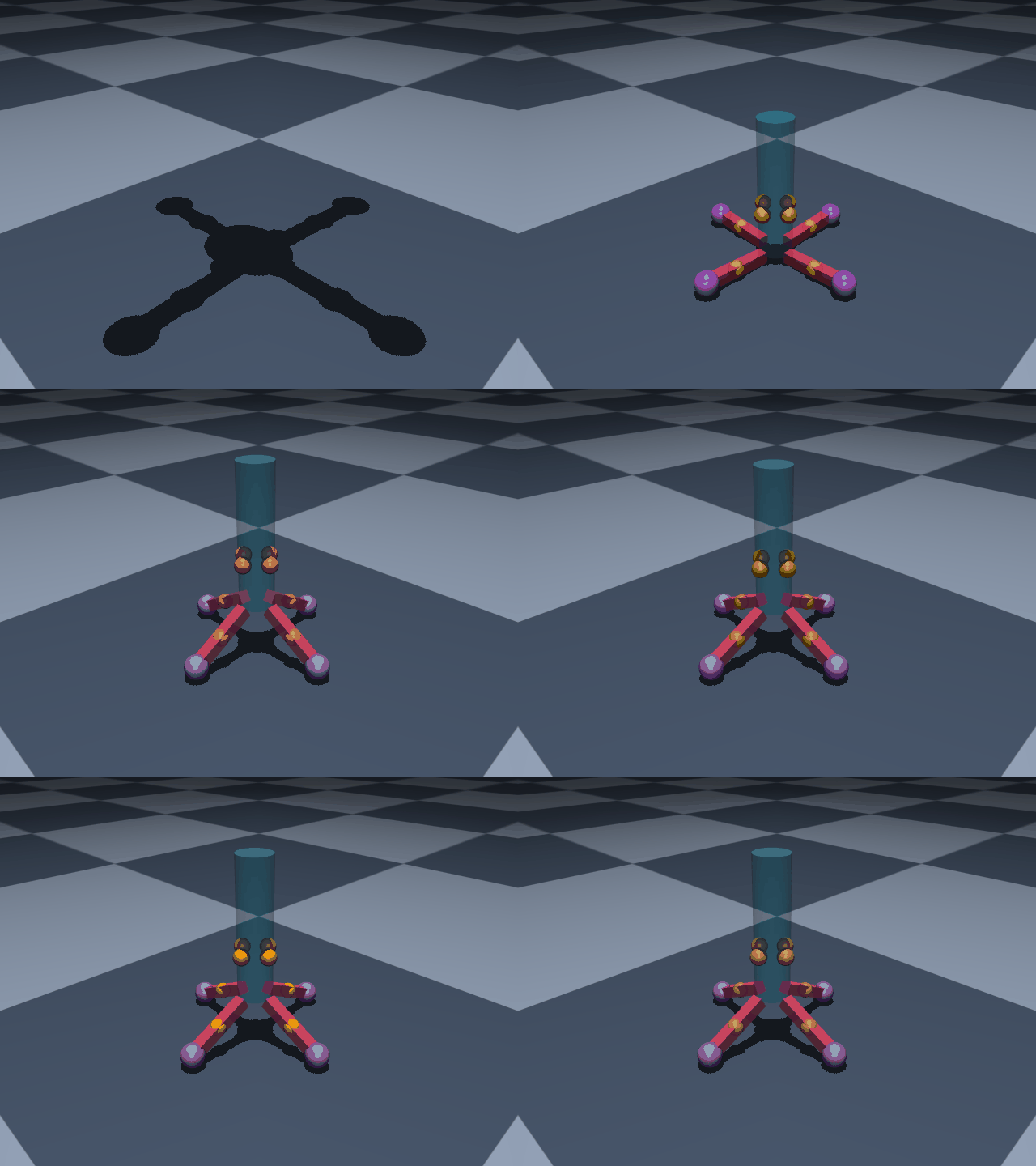
This guide will walk you through the complete definition of a model using MuJoCo. In the example, we will build a model of a set of landing gear for a vertically landing model rocket. This model's construction follows a more object-oriented approach than the previous example. The purpose of the model is to assess the set of inputs used to design the rocket's landing gear.
The visual result of the completed model: the rocket has four landing gear equally spaced around its radius. A spring-damper is located on each leg to absorb the impact.
This example is based on work performed while writing this paper.
The model we will build will be composed of Python classes specific to this application, and will use Mojo to help us build the MuJoCo MJCF files and run simulations. Optionally, the Mojo optimization plugin can be used to run a parameter design study to tune the design to custom requirements.
We recommend building this model line by line, limiting direct copying of code. We also highly recommend using Mojo's Reloaded tool to see live progress while modifying your code.
To begin, make a new project directory and run the following code to have Mojo build scaffolding for you:
Bash
mujoco-mojoinit
This will initialize your project with a mock Python file, some helpful bash scripts to make running Mojo easier, and a settings file so you can customize your project settings (see mujoco-mojo settings --help for more options).
After declaring this project's imports, we define a logger and global unit system (for easier conversions, MuJoCo tends to only play nice with SI units).
from__future__importannotationsfromenumimportStrEnumfrompathlibimportPathfromtypingimportSelfimportnumpyasnpfrompydanticimportFieldimportmujoco_mojoasmojoimportmujoco_mojo.runtimeasrtlogger=mojo.utils.get_logger(__name__)US=mojo.UnitSystem.si()# Define a unit system used throughout the model
This project will also make use of an Inputs class. This class is used to set some static values which we will be using all over the place. It is convenient to build a class like this since it can hold key values, and allow for easy modification when tinkering with the model later on.
This is also the first place where you see the use of our unit system (US). Since our unit system is defined as SI units, you can declare a value with any unit (a length of 3 inches is declared as 3 * US.inch) and US will automatically convert the value into a dimensional equivalent in SI units.
classTubeInput(mojo.UserData):"""Physical dimensions of the rocket's cylindrical body tube."""DIAMETER:float=3*US.inch"""Outer diameter of the body tube."""LENGTH:float=1*US.foot"""Length of the body tube."""@propertydefRADIUS(self)->float:"""Outer radius of the body tube, derived from `DIAMETER`."""returnself.DIAMETER/2classGearInput(mojo.UserData):"""Physical dimensions and layout of a single landing gear leg."""ANGLE:float=30"""Angle, in degrees, between the leg and the rocket's body tube at rest. 0 would fold the leg flat against the tube; 90 would point it straight out, perpendicular to the tube."""LENGTH:float=6*US.inch"""Length of the leg, from its hinge to the footpad."""WIDTH:float=1*US.inch"""Width of the leg's square cross-section."""SPRING_LEG_OFFSET:float=3*US.inch"""Distance along the leg, measured from its hinge, where the spring attaches."""SPRING_VERT_OFFSET:float=4*US.inch"""Height along the body tube, measured from the leg's hinge, where the spring's other end attaches."""PAD_DIAMETER:float=2*US.inch"""Diameter of the footpad sphere at the tip of the leg."""@propertydefPAD_RADIUS(self)->float:"""Radius of the footpad, derived from `PAD_DIAMETER`."""returnself.PAD_DIAMETER/2@propertydefSPRING_INIT_LENGTH(self)->float:""" Distance between the spring's two attachment sites when the leg is at its resting `ANGLE` — i.e. the spring's natural (rest) length. The leg's hinge and the spring's two attachment points form a side-angle-side triangle: we know both side lengths (`SPRING_LEG_OFFSET` and `SPRING_VERT_OFFSET`) and the angle between them (`ANGLE + 90`, since at `ANGLE = 0` the leg sticks out horizontally, perpendicular to the vertical tube). The law of cosines then gives the third side. """b=self.SPRING_LEG_OFFSETc=self.SPRING_VERT_OFFSETangle=np.deg2rad(self.ANGLE+90)returnnp.sqrt(b**2+c**2-2*b*c*np.cos(angle))classInputs(mojo.UserData):"""Top-level physical inputs for the vertically landed rocket model."""tube:TubeInput=Field(default_factory=TubeInput)"""Dimensions of the rocket's body tube."""gear:GearInput=Field(default_factory=GearInput)"""Dimensions and layout of each landing gear leg."""STARTING_HEIGHT:float=10*US.foot"""Height above the ground the rocket starts the simulation at, in free fall."""INPUTS=Inputs()
Success
That is enough of an introduction, everything we have done thus far is just setting ourselves up for success. In the next guide, you will see how to get Mojo started with generating the kinematic tree.