Writing and Running a Record Generator
Abstract
trendify turns a folder of raw run directories into plots and tables by mapping a single Python function, a generator function, over each one. This guide covers how to write that function and how to run it through the trendify CLI.
Generator Function
A generator function takes a directory path as an argument and returns a RecordList:
Example Generator Function Handle
trendify calls this function once per run directory, passing that directory's Path. The function processes raw data, and defines and returns a list of Record objects (Point2D, Trace2D, TableEntry, HistogramEntry, AxLine, and so on), each carrying one or more tags.
A tag is a string, an int, or a tuple of strings and ints, for example "histogram" or ("an_xy_plot", "trace_plot"). Records that share a tag get aggregated onto the same plot or table when the data is rendered.
Because of trendify's unique approach to building plots, the order you define a record has no bearing on the generators execution or the plot's appearnce.
Example
The example functions shown here are small record generators. In the example, it reads the results.csv that trendify example-data writes into each run directory (a time column plus one column per wave) and builds one example of every plottable record type.
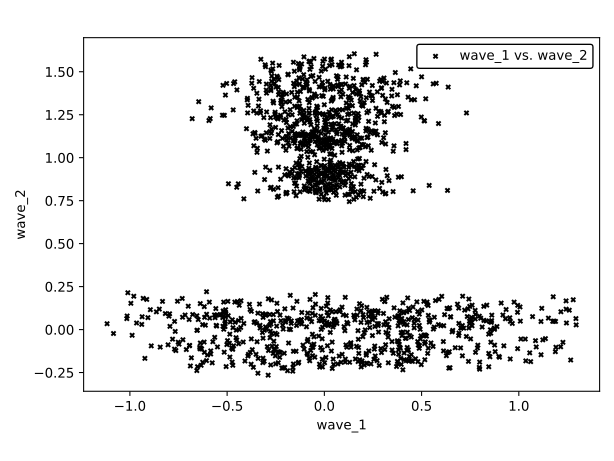
Scatter2D and Format2D
A Scatter2D plots a bulk collection of (x, y) points sharing one Marker style, unconnected by a line. Use it for a large array of points from one generation call that all share a style, such as a raw scatter of measurements from one run.
Format2D is itself a record: written once per tag, it configures that tag's axes (scale, limits, legend, grid, labels) for every other record sharing it:
Example
Scatter2D and Format2D.Trace2D
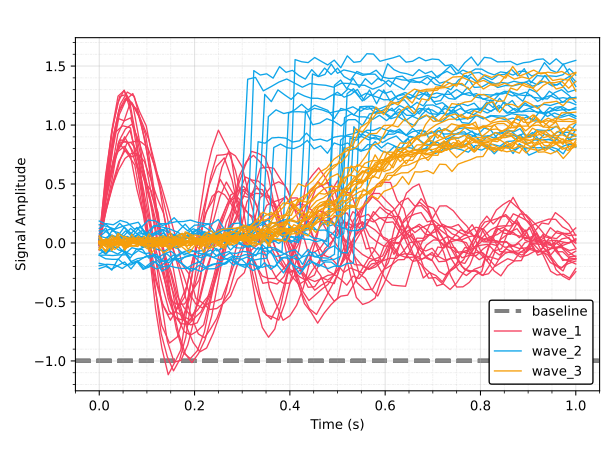
A Trace2D draws an xy line and a Pen controls how it looks:
Example
AxLine
An AxLine draws a horizontal or vertical reference line. Giving it the same tag as the traces above ("time_series") puts it on the same plot:
Example
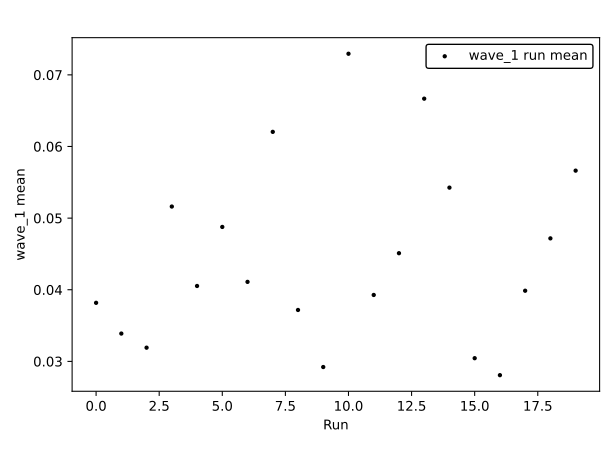
Trace2D and AxLine.Point2D
A Point2D is a single point, and unlike Scatter2D it's its own taggable, hoverable entity. This is the right choice when each point summarizes one run, aggregated across many runs that share a tag:
Example
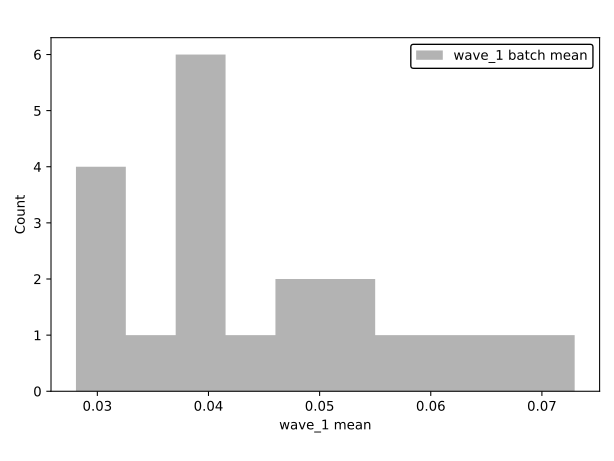
Point2D.Histogram Entry
A HistogramEntry bins one value into a histogram. Every entry sharing a tag (here, one per run) is binned into the same histogram:
Example
HistogramEntry.Table Entry
A TableEntry is a single (row, col, value) cell, collected into melted, pivot, and stats tables. row must be distinct per run, or entries from different runs collide on the same (row, col) pair:
Example
TableEntry Result
| Name | min | mean | max | sigma3 |
|---|---|---|---|---|
| wave_1 | 0.0280749 | 0.0447426 | 0.0729484 | 0.0381242 |
| wave_2 | 0.306726 | 0.636685 | 0.988092 | 0.594019 |
| wave_3 | 0.339161 | 0.484203 | 0.694916 | 0.305491 |
| row | wave_1 | wave_2 | wave_3 |
|---|---|---|---|
| 0 | 0.033884 | 0.4814 | 0.433685 |
| 1 | 0.0516166 | 0.608159 | 0.652808 |
| 2 | 0.0381756 | 0.435484 | 0.42154 |
| 3 | 0.0319141 | 0.548191 | 0.501546 |
| 4 | 0.0451015 | 0.94053 | 0.408942 |
| 5 | 0.0487682 | 0.847561 | 0.505141 |
| 6 | 0.0405259 | 0.614581 | 0.589901 |
| 7 | 0.0411004 | 0.712014 | 0.446269 |
| 8 | 0.0620432 | 0.40625 | 0.544996 |
| 9 | 0.0280749 | 0.663112 | 0.687029 |
| 10 | 0.0371765 | 0.988092 | 0.381971 |
| 11 | 0.0292106 | 0.97166 | 0.400953 |
| 12 | 0.0729484 | 0.470315 | 0.392392 |
| 13 | 0.039272 | 0.841134 | 0.471227 |
| 14 | 0.0398635 | 0.66098 | 0.694916 |
| 15 | 0.066676 | 0.40861 | 0.339161 |
| 16 | 0.0542576 | 0.593144 | 0.487257 |
| 17 | 0.0304435 | 0.67114 | 0.427966 |
| 18 | 0.047172 | 0.306726 | 0.424944 |
| 19 | 0.0566284 | 0.564627 | 0.471412 |
| row | col | value | unit |
|---|---|---|---|
| 0 | wave_1 | 0.033884 | m/s |
| 0 | wave_2 | 0.4814 | m/s |
| 0 | wave_3 | 0.433685 | m/s |
| 1 | wave_1 | 0.0516166 | m/s |
| 1 | wave_2 | 0.608159 | m/s |
| 1 | wave_3 | 0.652808 | m/s |
| 2 | wave_1 | 0.0381756 | m/s |
| 2 | wave_2 | 0.435484 | m/s |
| 2 | wave_3 | 0.42154 | m/s |
| 3 | wave_1 | 0.0319141 | m/s |
| 3 | wave_2 | 0.548191 | m/s |
| 3 | wave_3 | 0.501546 | m/s |
| 4 | wave_1 | 0.0451015 | m/s |
| 4 | wave_2 | 0.94053 | m/s |
| 4 | wave_3 | 0.408942 | m/s |
| 5 | wave_1 | 0.0487682 | m/s |
| 5 | wave_2 | 0.847561 | m/s |
| 5 | wave_3 | 0.505141 | m/s |
| 6 | wave_1 | 0.0405259 | m/s |
| 6 | wave_2 | 0.614581 | m/s |
| 6 | wave_3 | 0.589901 | m/s |
| 7 | wave_1 | 0.0411004 | m/s |
| 7 | wave_2 | 0.712014 | m/s |
| 7 | wave_3 | 0.446269 | m/s |
| 8 | wave_1 | 0.0620432 | m/s |
| 8 | wave_2 | 0.40625 | m/s |
| 8 | wave_3 | 0.544996 | m/s |
| 9 | wave_1 | 0.0280749 | m/s |
| 9 | wave_2 | 0.663112 | m/s |
| 9 | wave_3 | 0.687029 | m/s |
| 10 | wave_1 | 0.0371765 | m/s |
| 10 | wave_2 | 0.988092 | m/s |
| 10 | wave_3 | 0.381971 | m/s |
| 11 | wave_1 | 0.0292106 | m/s |
| 11 | wave_2 | 0.97166 | m/s |
| 11 | wave_3 | 0.400953 | m/s |
| 12 | wave_1 | 0.0729484 | m/s |
| 12 | wave_2 | 0.470315 | m/s |
| 12 | wave_3 | 0.392392 | m/s |
| 13 | wave_1 | 0.039272 | m/s |
| 13 | wave_2 | 0.841134 | m/s |
| 13 | wave_3 | 0.471227 | m/s |
| 14 | wave_1 | 0.0398635 | m/s |
| 14 | wave_2 | 0.66098 | m/s |
| 14 | wave_3 | 0.694916 | m/s |
| 15 | wave_1 | 0.066676 | m/s |
| 15 | wave_2 | 0.40861 | m/s |
| 15 | wave_3 | 0.339161 | m/s |
| 16 | wave_1 | 0.0542576 | m/s |
| 16 | wave_2 | 0.593144 | m/s |
| 16 | wave_3 | 0.487257 | m/s |
| 17 | wave_1 | 0.0304435 | m/s |
| 17 | wave_2 | 0.67114 | m/s |
| 17 | wave_3 | 0.427966 | m/s |
| 18 | wave_1 | 0.047172 | m/s |
| 18 | wave_2 | 0.306726 | m/s |
| 18 | wave_3 | 0.424944 | m/s |
| 19 | wave_1 | 0.0566284 | m/s |
| 19 | wave_2 | 0.564627 | m/s |
| 19 | wave_3 | 0.471412 | m/s |
Putting it Together
The generator function itself just calls each of the helpers above and returns the combined list:
A generator you write for real data follows the same shape: read the run directory's contents (CSV, JSON, or whatever format your raw data uses), build up a RecordList, tag each record according to how you want it grouped, and return the list.
Running the Generator
The trendify CLI accepts a generator in the form module:function, package.submodule.module:Class.method (@classmethod or @staticmethod), or /path/to/file.py:function.
Generating Records
trendify generate maps the generator over a set of input directories and writes the resulting records into a trendify.db under the given output directory:
trendify generate \
    --input-directories "./data/models/*" \
    --record-generator "docs/example_generator.py:generate_records" \
    --output-directory "./data/trendify"
--input-directories accepts glob patterns and can be repeated to combine several. Use --n-procs to fan the generator call out across multiple worker processes.
But Why?
This can be helpful if you are still debugging your generator, or you only care about viewing interactive assets (see the later section on Trendify Viewer)
Rendering Assets
trendify render reads the records already written to trendify.db and produces CSV tables and Matplotlib images, one set of assets per tag, in <output-directory>/assets:
Running In One Step
trendify run combines the two steps above:
trendify run \
    --input-directories "./data/models/*" \
    --record-generator docs/example_generator.py:generate_records \
    --output-directory ./data/trendify
Trendify Viewer
trendify viewer launches a local web dashboard for browsing a trendify.db file's records interactively, by tag, table, or plot:
Embedding the Viewer in Your Own Site
The viewer is an ordinary FastAPI app, so an existing FastAPI site can serve it and show it in an <iframe>:
from fastapi import FastAPI
from trendify.viewer.app import create_app

site = FastAPI()
site.mount("/viz", create_app("data/trendify/trendify.db", show_db_path=False))
<iframe src="/viz/" title="Trendify viewer" allow="fullscreen; clipboard-write"
        style="width: 100%; height: 80vh; border: 0"></iframe>
- Where it lives: a path prefix (as above) or its own hostname (
Host("viewer.example.com", app=...)) both work, and your site's startup needs no changes.show_db_path=Falsekeeps the server's file path out of the page. - Access control: the viewer has no login of its own, so put it behind your site's. A small ASGI wrapper around the mounted app protects its pages and data in one place.
- CORS: not needed for an iframe, because the viewer only talks to its own address. Only if scripts on your page fetch from the viewer's API, pass
cors_origins=["https://your-site.example"]. - Security headers: if your site sets
X-Frame-Optionsorframe-ancestors, allow framing on the viewer's path. If it sets a Content Security Policy, the viewer's pages need one that allows inline scripts and styles andunsafe-eval, for examplescript-src 'self' 'unsafe-inline' 'unsafe-eval'; style-src 'self' 'unsafe-inline'; img-src 'self' data: blob:. - Other sites: browsers that block third-party storage can't save the viewer's theme and layout when it is framed from a different site. It still works; those settings just reset on reload.
Success
You can now write a RecordGenerator and run it end to end:
generateto write recordsrenderfor static CSV tables and plotsrunto do both in one stepviewerto browse the results in a live dashboard.
Point --record-generator at your own function and --input-directories at your real raw data to automate record creation in your project.