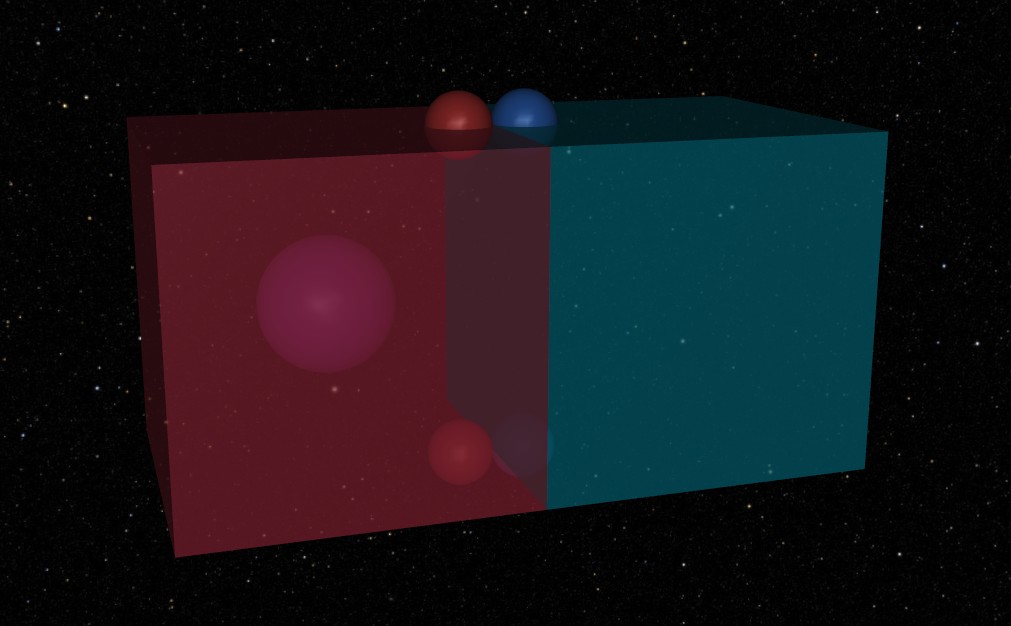
The Generate Script is the heartbeat of your simulation pipeline. Its job is to programmatically assemble the MuJoCo MJCF model and perform all stochastic (random) draws. By the time this function returns, the simulation should be "frozen" in its initial state, ready for the physics engine to take over.
The visual result of the completed generator script: two translucent boxes with freejoints, spring attachment sites (red and blue spheres), and a central tracking site (fuchsia sphere), all set against a starry skybox.
Suggested Reading: Mojo Reloaded
After a brief skim of this guide, you may want to take a look at the guide on using Mojo Reloaded to accelerate your prototyping.
The generate script is built around the "MojoGenerate" protocol. This function provides a bare bones mojo.MojoModel which must be its first argument and optional *args and **kwargs.
Because Mojo separates Generation (building the model) from Runtime (running the physics), you often need to pass references between them. Sites, bodies, or specific random values sampled during generation are often needed later to apply forces.
We use a Handoff dataclass or Pydantic BaseModel to encapsulate these references. This keeps your generate function clean and your runtime logic strongly typed.
Warning: User Data Validation
Using a non-Pydantic BaseModel based Handoff will not be validated. If it is critical to have a validated Handoff you should use a BaseModel.
Handoff objects are also not serialized when running, so it is not recommended to rely on this for future recreation of models.
FIXED_CAMERA_NAME=mojo.CameraName("static")classHandoff(mojo.UserData):""" User-defined interconnect between the generator and runtime function. Retains MJCF definitions for use in the physics loop. """box1_rot:mojo.AnySitesprings:dict[Literal["pz","mz"],tuple[mojo.AnySite,mojo.AnySite,mojo.NamedValue,mojo.NamedValue],]=Field(default_factory=dict)defdefine_spring(self,loc:Literal["pz","mz"],box1:mojo.Body,box2:mojo.Body,mojo_model:mojo.MojoModel,):mult=1ifloc=="pz"else-1box1.sites.append(base:=mojo.SiteSphere(name=mojo.SiteName(f"{loc}_spring_base_site"),size=0.1,pose=mojo.PoseQuat(pos=np.asarray([0.4,0,mult*0.5])),rgba=mojo.utils.Color.RED_500.rgba,))box2.sites.append(tip:=mojo.SiteSphere(name=mojo.SiteName(f"{loc}_spring_tip_site"),size=0.1,pose=mojo.PoseQuat(pos=np.asarray([-0.4,0,mult*0.5])),rgba=mojo.utils.Color.BLUE_500.rgba,))# Perform random draws tied to the model seedstiffness=mojo_model.sample_dist(mojo.TruncatedNormalDistribution(name=mojo.DistName(f"{loc}_stiffness"),nominal=100,mu=100,sigma=20,low=0,)).squeeze()stroke=mojo_model.sample_dist(mojo.TruncatedNormalDistribution(name=mojo.DistName(f"{loc}_stroke"),nominal=(nom:=1),mu=nom,sigma=nom*0.1,low=nom*0.8,high=nom*1.2,)).squeeze()self.springs.update({loc:(base,tip,stiffness,stroke)})defadd_spring_force(self,loc:Literal["pz","mz"]):base,tip,stiffness,stroke=self.springs[loc]spring_force=rt.PointToPointForce.stroke_compression_spring(name=f"{loc}_spring",action_site=base,xtion_site=tip,stiffness=float(stiffness),max_stroke=float(stroke),preload=1000ifloc=="pz"else750,).register_to_rm()base.request()tip.request()spring_force.request()
Assets like textures and materials are defined in the mojo_model.mjcf.assets list. This is where you handle external files (like skyboxes) or built-in procedural textures like checkerboards.
Notice in the following code how enumerations such as mojo.TextureType.D2 and mojo.TextureBuiltInType.CHECKER are used instead of strings.
Tip: Walrus Operator (:=)
Notice the use of the walrus operator, this allows you to define an object and immediately keep a reference to it for later use in the script.
We will be using the grid_mat Material in the next section!
Tip: Color Utilities
Mojo provides some helpful utilities like mojo.utils.Color. This class provides a ton of helpful shortcuts for Tailwind CSS colors. This makes it really easy to customize the appearance of your model.
# Configure simulation assetsmojo_model.mjcf.assets=[mojo.Asset(textures=[grid_tex:=mojo.TextureBuiltIn(name=mojo.TextureName("grid_tex"),type=mojo.TextureType.D2,builtin=mojo.TextureBuiltInType.CHECKER,width=512,height=512,rgb1=mojo.utils.Color.SLATE_600.rgb,rgb2=mojo.utils.Color.SLATE_800.rgb,)],materials=[grid_mat:=mojo.Material(name=mojo.MaterialName("grid_mat"),texture=grid_tex.name,texrepeat=np.asarray((1,1)),)],),]# Handle skybox if in nominal modeifmojo_model.is_nominal:mojo_model.mjcf.assets.append(mojo.Asset(textures=[mojo.Texture(name=mojo.TextureName("skybox_texture_colors"),type=mojo.TextureType.SKYBOX,fileback=skybox_folder/"nz.png",filedown=skybox_folder/"ny.png",filefront=skybox_folder/"pz.png",fileleft=skybox_folder/"nx.png",fileright=skybox_folder/"px.png",fileup=skybox_folder/"py.png",)]),)
Mojo uses DepPath to handle asset paths, ensuring that your models remain portable across different machines. They have identical properties to pathlib.Path. In the MojoModel.mjcf, wherever you would use a Path object, instead use a DepPath.
Using DepPath is the key to portability; it tells Mojo to track the file as a dependency that is integral to your model. This allows Mojo to share a file on disk between different runs, preventing extra bloat!
The worldbody contains your static environment and the kinematic tree of your bodies. Mojo's API mirrors the XML hierarchy exactly.
Note: Pose
Mojo provides many ways to define a position and orientation (pose). Shown below is a pose definition using mojo.PoseQuat. Other orientation options are using an axis angle, Euler angle sequence, X and Y axes, or a Z axis.
Recorded (stored in the results database as a NamedValue).
Overridable (can be forced to a specific value via the CLI).
Note: Squeezing NamedValues
The mojo_model.sample_dist method returns a NamedValue which works like a numpy array. You can use the .sqeeze() method to compact it (i.e., [1.0].squeeze() == 1.0)
Tip: Unit Systems
The MojoModel provides a helpful way to define a model unit system which allows you to define values in whatever unit you want while maintaining consistent behavior while solving the dynamics.
# Perform random draws tied to the model seedstiffness=mojo_model.sample_dist(mojo.TruncatedNormalDistribution(name=mojo.DistName(f"{loc}_stiffness"),nominal=100,mu=100,sigma=20,low=0,)).squeeze()stroke=mojo_model.sample_dist(mojo.TruncatedNormalDistribution(name=mojo.DistName(f"{loc}_stroke"),nominal=(nom:=1),mu=nom,sigma=nom*0.1,low=nom*0.8,high=nom*1.2,)).squeeze()
Lets tie things up! At the end of your generate function, you attach your Handoff data to the mojo_model.user_data attribute. This makes it accessible to the runtime function later.
# Pack and execute handoffhandoff=Handoff(box1_rot=box1_rot_site)mojo_model.user_data=handoffhandoff.define_spring("pz",box1,box2,mojo_model)handoff.define_spring("mz",box1,box2,mojo_model)returnmojo_model
Note: User Data Validation
User data is also required to be serializable! It should be a Pydantic BaseModel. If there is something you really are not able to make serializable, you can always use a PrivateAttr but this should be considered a last resort.
All of the Mojo MJCF objects are serializable. For some Numpy helpers, try using mojo.VecN!
Success
Okay. That was kind of a lot.
Now that we have completed building the kinematic tree, defining a user data to handoff, and an introduction to using distribution sampling, we now move on to defining the runtime behavior of the physics engine.
defgenerate(mojo_model:mojo.MojoModel,*args,**kwargs)->mojo.MojoModel:"""Generates the MJCF model and samples distributions."""skybox_folder=(mojo.DepPath()/"textures"/"stars").resolve()# Configure simulation assetsmojo_model.mjcf.assets=[mojo.Asset(textures=[grid_tex:=mojo.TextureBuiltIn(name=mojo.TextureName("grid_tex"),type=mojo.TextureType.D2,builtin=mojo.TextureBuiltInType.CHECKER,width=512,height=512,rgb1=mojo.utils.Color.SLATE_600.rgb,rgb2=mojo.utils.Color.SLATE_800.rgb,)],materials=[grid_mat:=mojo.Material(name=mojo.MaterialName("grid_mat"),texture=grid_tex.name,texrepeat=np.asarray((1,1)),)],),]# Handle skybox if in nominal modeifmojo_model.is_nominal:mojo_model.mjcf.assets.append(mojo.Asset(textures=[mojo.Texture(name=mojo.TextureName("skybox_texture_colors"),type=mojo.TextureType.SKYBOX,fileback=skybox_folder/"nz.png",filedown=skybox_folder/"ny.png",filefront=skybox_folder/"pz.png",fileleft=skybox_folder/"nx.png",fileright=skybox_folder/"px.png",fileup=skybox_folder/"py.png",)]),)mojo_model.mjcf.worldbody=mojo.WorldBody(geoms=[]ifmojo_model.is_nominalelse[mojo.GeomPlane(name=mojo.GeomName("floor"),size=np.asarray([0,0,0.1]),pose=mojo.PoseQuat(pos=np.asarray((0,0,-5))),material=grid_mat.name,contype=0,conaffinity=0,),])mojo_model.mjcf.options=[mojo.Option(timestep=0.001,gravity=np.asarray((0,0,0)))]mojo_model.mjcf.visuals=[mojo.Visual(map=mojo.VisualMap(force=4),scale=mojo.VisualScale(forcewidth=0.1),)]mojo_model.mjcf.worldbody.cameras=[mojo.Camera(name=FIXED_CAMERA_NAME,pose=mojo.PoseEuler(pos=np.asarray((0,-10,0)),euler=np.asarray((90,0,0)),),fovy=30,),]# Create two boxes using the walrus operator for immediate referencingmojo_model.mjcf.worldbody.bodies.extend([box1:=mojo.Body(name=mojo.BodyName("box1"),pose=mojo.PoseQuat(pos=np.asarray([-0.5,0,0])),freejoints=[mojo.FreeJoint()],geoms=[mojo.GeomBox(name=mojo.GeomName("g1"),size=np.asarray([0.5,0.5,0.5]),rgba=mojo.utils.Color.ROSE_500.with_alpha(0.5),)],),box2:=mojo.Body(name=mojo.BodyName("box2"),pose=mojo.PoseQuat(pos=np.asarray([0.5,0,0])),freejoints=[mojo.FreeJoint()],geoms=[mojo.GeomBox(name=mojo.GeomName("g2"),size=np.asarray([0.5,0.5,0.5]),rgba=mojo.utils.Color.CYAN_500.with_alpha(0.5),)],),])box1.sites.append(box1_rot_site:=mojo.SiteSphere(name=mojo.SiteName("box1_rot_site"),size=0.2,pose=mojo.PoseEuler(euler=np.asarray((45,45,45))),rgba=mojo.utils.Color.FUCHSIA_500.rgba,))# Pack and execute handoffhandoff=Handoff(box1_rot=box1_rot_site)mojo_model.user_data=handoffhandoff.define_spring("pz",box1,box2,mojo_model)handoff.define_spring("mz",box1,box2,mojo_model)returnmojo_model